How bills come to exist
You rarely type a bill. BiB writes most of them from the signed engagement letter.
| What the letter says | When the bill appears on To raise | What you do |
|---|---|---|
| A monthly, quarterly or yearly fee | On the period's bill date. By default that is the last day of the period. | Raise it. |
| An advance at signing | On the day the letter is signed. BiB also drafts the advance invoice by itself if it knows the tax rate. | Issue the draft, or raise it from To raise. |
| A one-time fee with milestones | Each milestone on its day: the number of days after the work starts. | Raise it. |
| A one-time fee (what is left after milestones) | When the job's last step is marked done. | Raise it. |
| One-time work with no process | When you click Raise invoice under One-time work with no process on To raise. | Click it when the work is done. |
| Anything else | Never. You raise it by hand. | Use Raise an invoice on Billing › Invoices . |
BiB looks for bills that have fallen due once a day, on its own. Three things must be true before it writes a period's bill:
- Automatic billing is on (see Part 1, "Turn on automatic billing"). Advances are written even when it is off.
- The service's billing is approved in Work › Command center . BiB says "Its bills are made on tomorrow's billing run." The service has a first bill date. Most get one when their billing is approved.
"At the end" or "at the start"? On the letter, each line's Billed choice decides the bill date: At the end of each month (the default), At the start of each month, or On a date I choose. Quarterly and yearly fees have the same choices.
Part of a month is billed by days Bookkeeping costs ₹22,500 a month and starts on 11 November. The November bill is for 20 of 30 days: ₹15,000. To raise shows "20 of 30 days" beside the period.
The invoice date is the day you issue it A bill dated 31 October that you issue on 2 November becomes an invoice dated 2 November.
Change when a service starts billing
Who can do it: Partner or manager
Where: the client's page, Engagements
Use this when billing should start earlier or later than BiB suggested, for example when the work began a month before the letter's billing.
- On the client's page, open Engagements. The Billing column shows each service's schedule, for example "From November 2026, First invoice 30 Nov 2026".
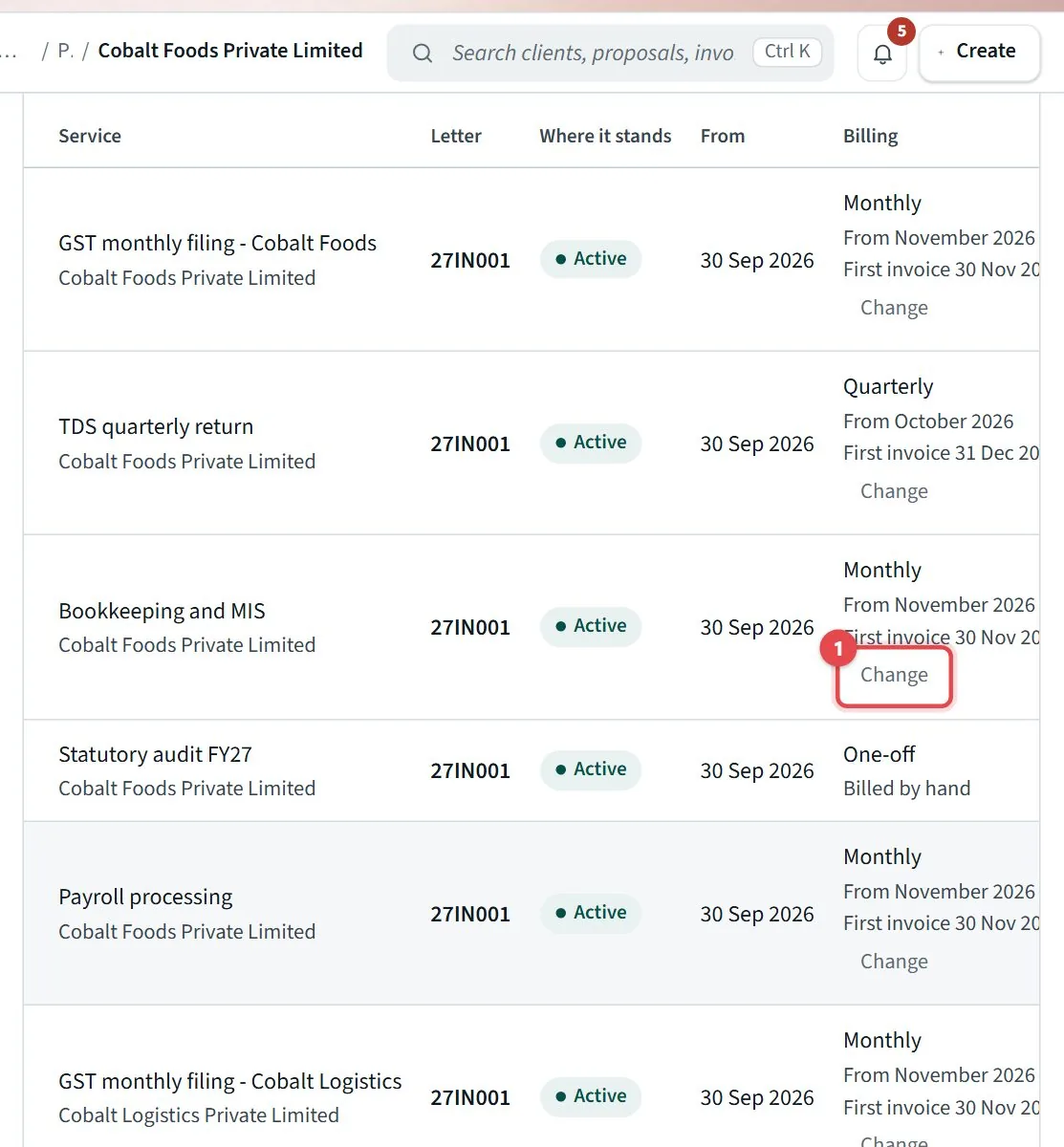 Engagements. Change (1) on the service's row.
-
Click Change in that service's Billing column. (On a service with no schedule yet, the button is Set billing.)
-
In Bill from, choose the first day of the first period to bill, for example 1 October 2026.
-
In First invoice on, choose the date that period's bill falls due, for example 31 October 2026. Each later bill follows one period after.
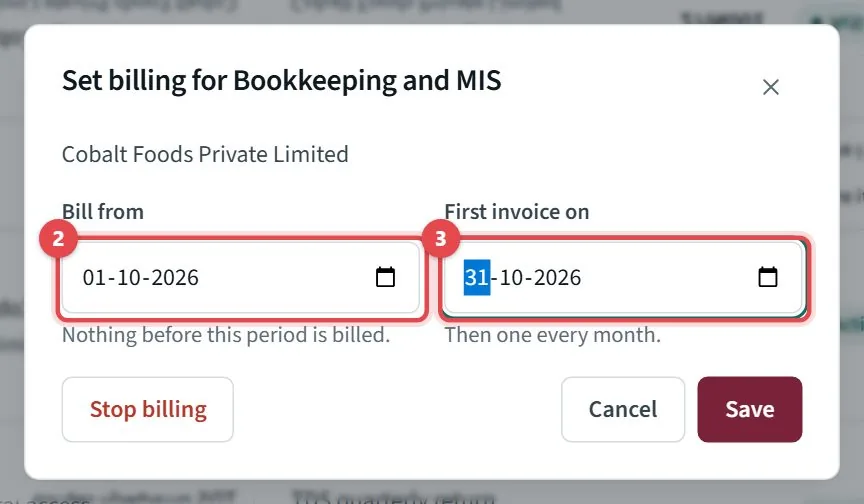 Set billing: Bill from (2) and First invoice on (3).
- Click Save.
BiB writes the missing bills on its next daily run, so they are on To raise by the next day. To stop a service's billing, open the same box and click Stop billing.
Nothing before Bill from is billed. If the work started on 30 September and Bill from is 1 October, the one day in September is never billed. Automatic billing's Starts from month limits it too: with Starts from November 2026, October is not billed, whatever Bill from says.
Services with no schedule at all are listed under Billing not set up at the bottom of Billing › To raise , with BiB's Suggested first bill. The card says "Recurring work the sweep cannot bill yet": the sweep is BiB's daily billing run. Click Set billing on the row to open the same box.
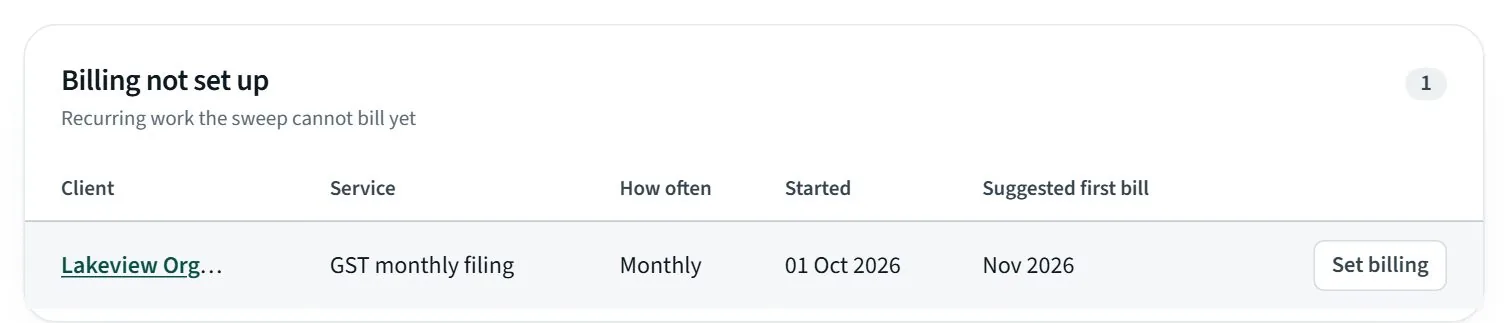 Billing not set up: a service with no schedule yet, and its Set billing button.
| You see | Do this |
|---|---|
| "Quarterly and yearly billing follow the firm's financial year, and the firm has not said when its year starts. Set it in the compliance settings first." | Ask a partner to set the financial year under Settings › The firm › Your firm , Deadlines. |
| "The first invoice cannot be dated before the first period it bills begins (…)." | Pick a First invoice on date inside or after the first period. |
Bill a one-time job in parts (milestones)
Who can do it: Whoever drafts the engagement letter
Where: the draft engagement letter, on a one-time line with its own fee
-
On the line, click Add milestones.
-
For each part, type a name, the number of days after the work starts, and an amount or a "% of the fee".
-
Click Add a milestone for more parts (up to 12), then Save milestones.
What is left of the fee is billed "on completion", when the job's last step is done. Until billing is approved in the Command center, milestones can still be changed there.
An audit in three parts Fee ₹1,75,000. "Fieldwork", 30 days, 40%: ₹70,000. "Draft report", 60 days, 30%: ₹52,500. The last ₹52,500 is billed when the audit's last step is done.
A skipped milestone is not added back If you skip the ₹52,500 draft-report bill, the final bill is still only ₹52,500. Skip only what the client will truly never pay.