Read the billing overview
Who can do it: Everyone; amounts only for people who can see fees
Where: Billing › Overview
The Overview answers: what did we bill, what came in, what is still owed, and what needs someone today.
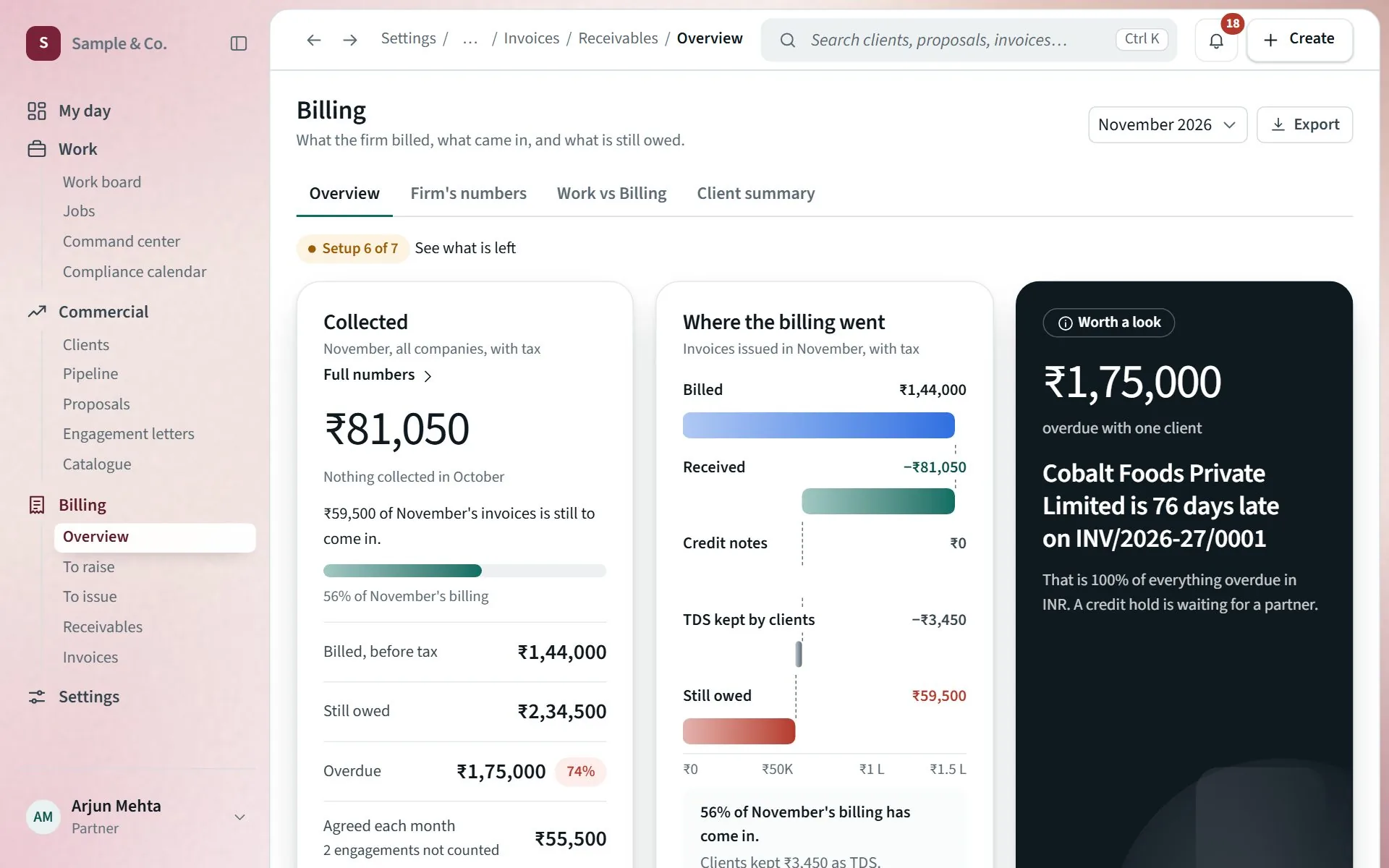 The Overview, as the partner sees it.
- Choose the month at the top right, and click Export for a spreadsheet. A firm with several companies also picks the company there.
- Collected and Where the billing went show the month's money: billed, received, credit notes, TDS kept by clients and what is still owed.
- The dark Worth a look card picks the one thing most worth your time, for example the most overdue invoice.
- How late the money is, further down, splits what is owed by age.
- Needs you lists the jobs waiting, each with a link: overdue invoices, drafts to issue, bills to raise, invoices that need an IRN, invoices never emailed and advances to adjust.
- A partner also sees a Setup pill counting the billing settings still missing. Click See what is left to finish them.
The other tabs are Firm's numbers (monthly recurring fees, who owes what, revenue by company and manager), Work vs Billing (see "Check that finished work was billed") and Client summary (each client's billing so far, or its coming months).