Choose how invoice numbers look
Who can do it: Partner
Where: Settings › Documents › Brand , then Invoice numbers
BiB numbers invoices for you: one series per company and financial year, in order, with no gaps. Out of the box an invoice reads INV/2026-27/0001 .
- Click Invoice numbers under your company.
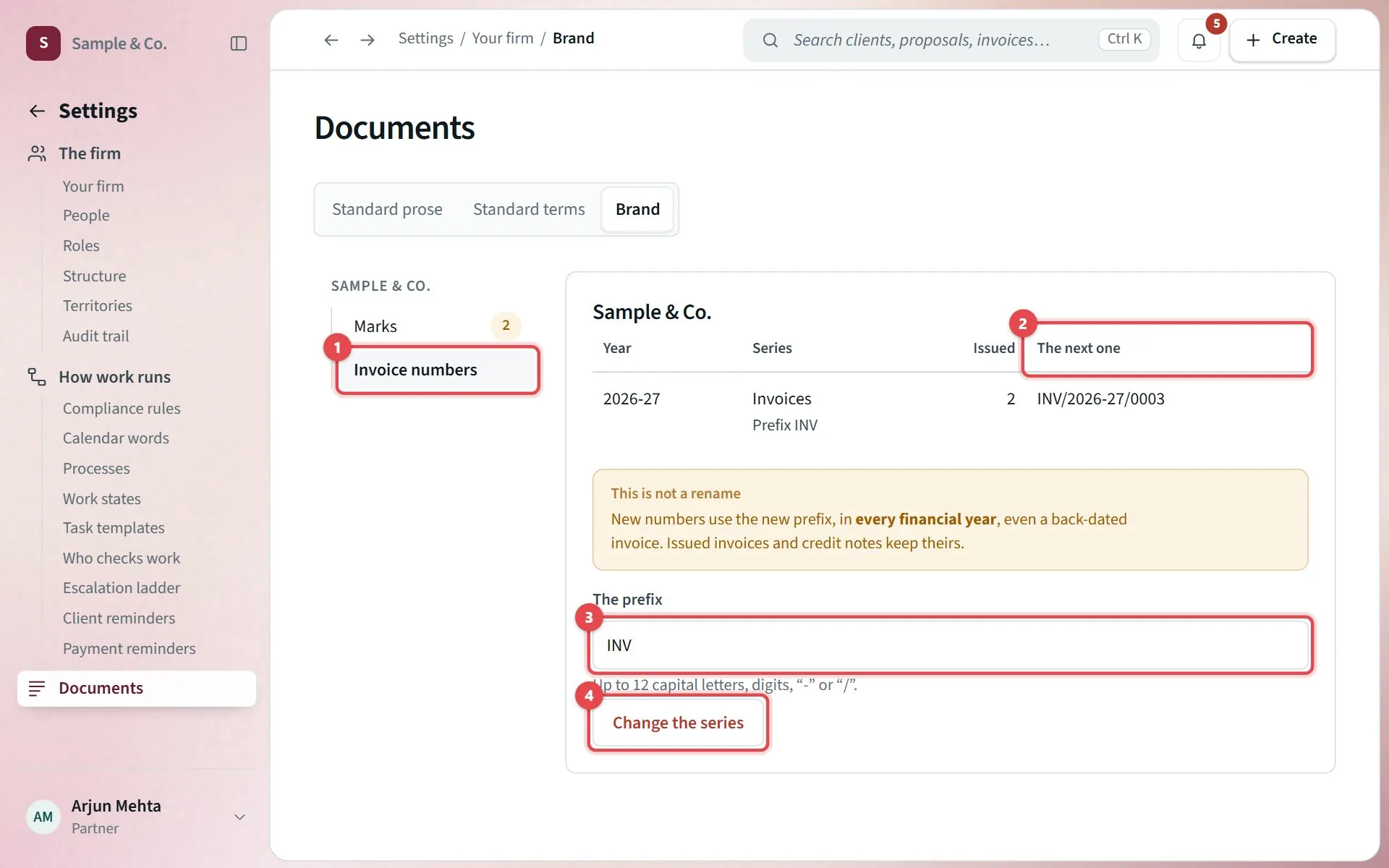 Invoice numbers (1): the next number (2), the prefix (3) and Change the series (4).
-
Read the table. The next one shows the number the next invoice will get.
-
To change the start of the number, type it in The prefix. Use up to 12 capital letters, digits, "-" or "/", for example
SC. -
Click Change the series.
This is not a rename. New invoices use the new prefix. Invoices already issued keep their old numbers. Change the prefix before your first invoice if you can.
When an invoice gets its number A draft has no number. It gets one only when it is issued. A draft that is cancelled uses up no number. An issued invoice that is cancelled keeps its number, and the number is never used again.
A GST invoice number may be at most 16 characters long. If your prefix makes the number longer, the screen warns you: "Longer than a GST invoice number may be".