Know what your client receives
Who does it: The person you invited, from their own inbox
The email's subject is "Sample & Co. has invited you to their client portal". It comes in the name of the client's Key Manager (for example "Arjun Mehta, Sample & Co."), and a reply to it reaches the Key Manager. Tell the client to expect it.
What the client does:
-
Opens the newest invitation email and clicks Choose a password.
-
Types a password in New password, and the same again in Type it again.
-
Clicks Set password and sign in. They land on their portal, already signed in.
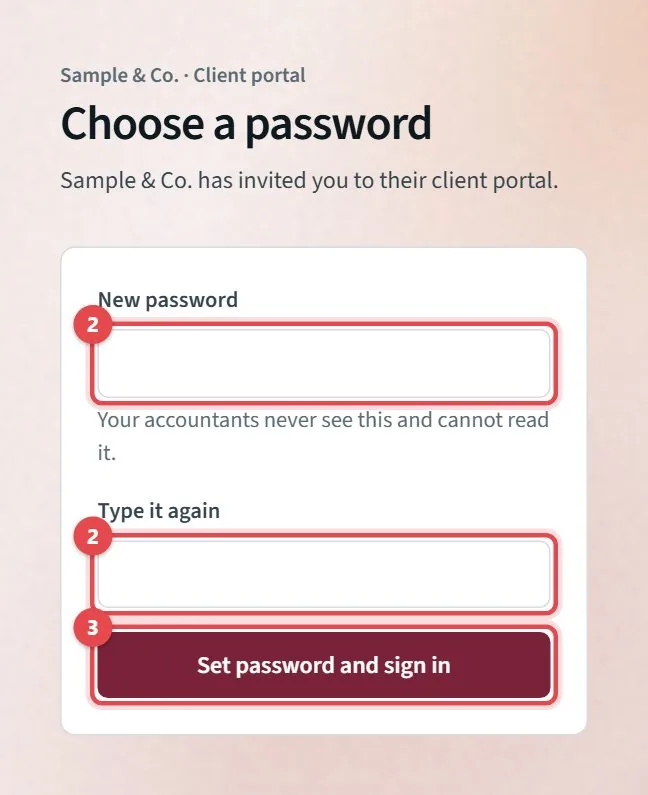 The page the client sees from the email. Nobody at the firm ever sees their password.
From then on they sign in on the same sign-in page as you, with their email and password. BiB takes them straight to their portal, never to your screens.
The password must be at least 12 characters, and this page does not say so until it refuses one. Example: "Cobalt2026!" (11 characters) is refused. "cobalt foods accounts" is fine. A short phrase is easiest.
The link works once, for 7 days. Example: invited on 3 Nov, the link stops working on 10 Nov. After that, send it again (next task).
| The client sees | What to tell them |
|---|---|
| "The two passwords do not match." | Type both boxes again. The link still works. |
| "Password must be between 12 and 256 characters. …" | Choose a longer password. The link still works. |
| "This link is not valid, has expired, or has been used" | Ask the firm for a new one. A partner clicks Send it again. |
| "This link is incomplete" | The link was cut short in their email. Open the whole link, or ask you to send it again. |
Someone who already has a BiB login gets a different email. If the address already signs in to BiB (say the client's finance head also works with another firm on BiB), they get "Sample & Co. has given you access to their client portal". It signs them in. Their password does not change.