Link a director or signatory to a client
Who can do it: Partner, manager or associate
Where: Commercial › Clients , then the company, then Relationships
Before you start: The person must already be in BiB (see "Add an individual as a client").
-
Open the company and click Relationships.
-
Under The other party, choose the person (or another company in the group).
-
Under How they are related, pick the sentence that is true, for example that Karthik Raman is a director of Nilgiri Textiles.
-
Set From: the day it became true.
-
Click Record it.
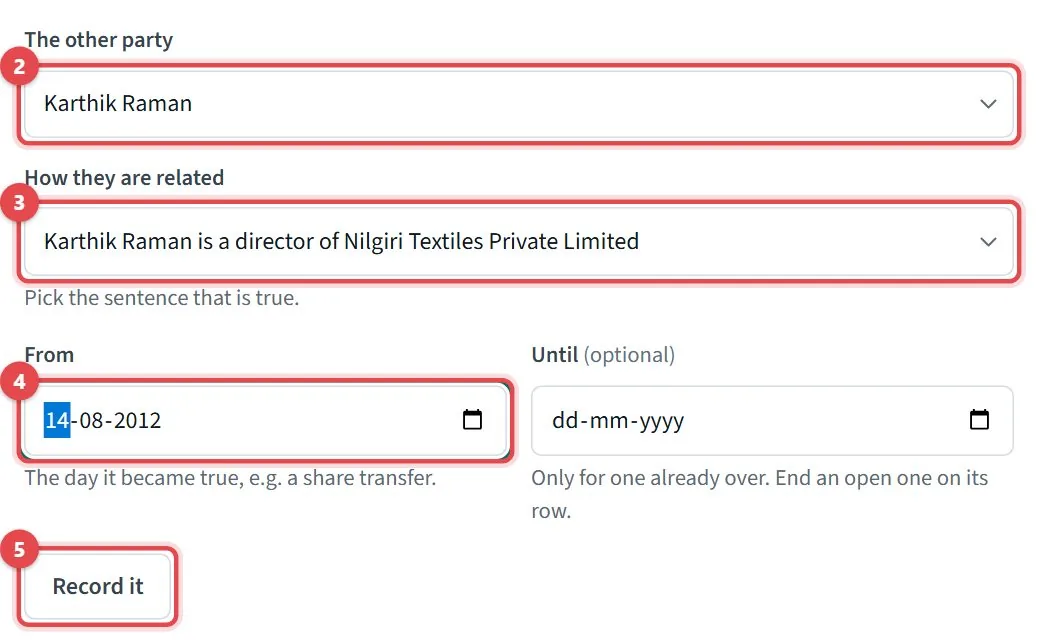 Recording Karthik Raman as a director of Nilgiri Textiles.
When a relationship ends (a director resigns), click End it on its row and give the first day it is no longer true.
Only linked people can receive a letter. A letter's Addressed to list shows only people linked here as director, authorised signatory, employee or shareholder. Example: Lakeview has nobody linked, so its letters can only be addressed to the company.
Groups are linked here too. Link a subsidiary to its parent here. A letter can then cover work for both companies.