Give a rule its date
Use this for a rule Waiting on a fact that does apply to your clients, or to correct a wrong date.
Who can do it: Partner
Where: Settings › How work runs › Compliance rules , tab Waiting on a fact
Before you start: You know the real due date from the law.
-
Click Edit on the rule's row. The rule opens under its row.
-
Leave How often and Periods follow as they are unless they are wrong.
-
Under When it is due, choose This rule computes a date.
-
In Counted as, choose A day of a month. Type the Day of the month (for example 20) and the Months after the period ends (1 means the following month, 0 the same month).
-
Read the sentence Reads as: and check it against the law.
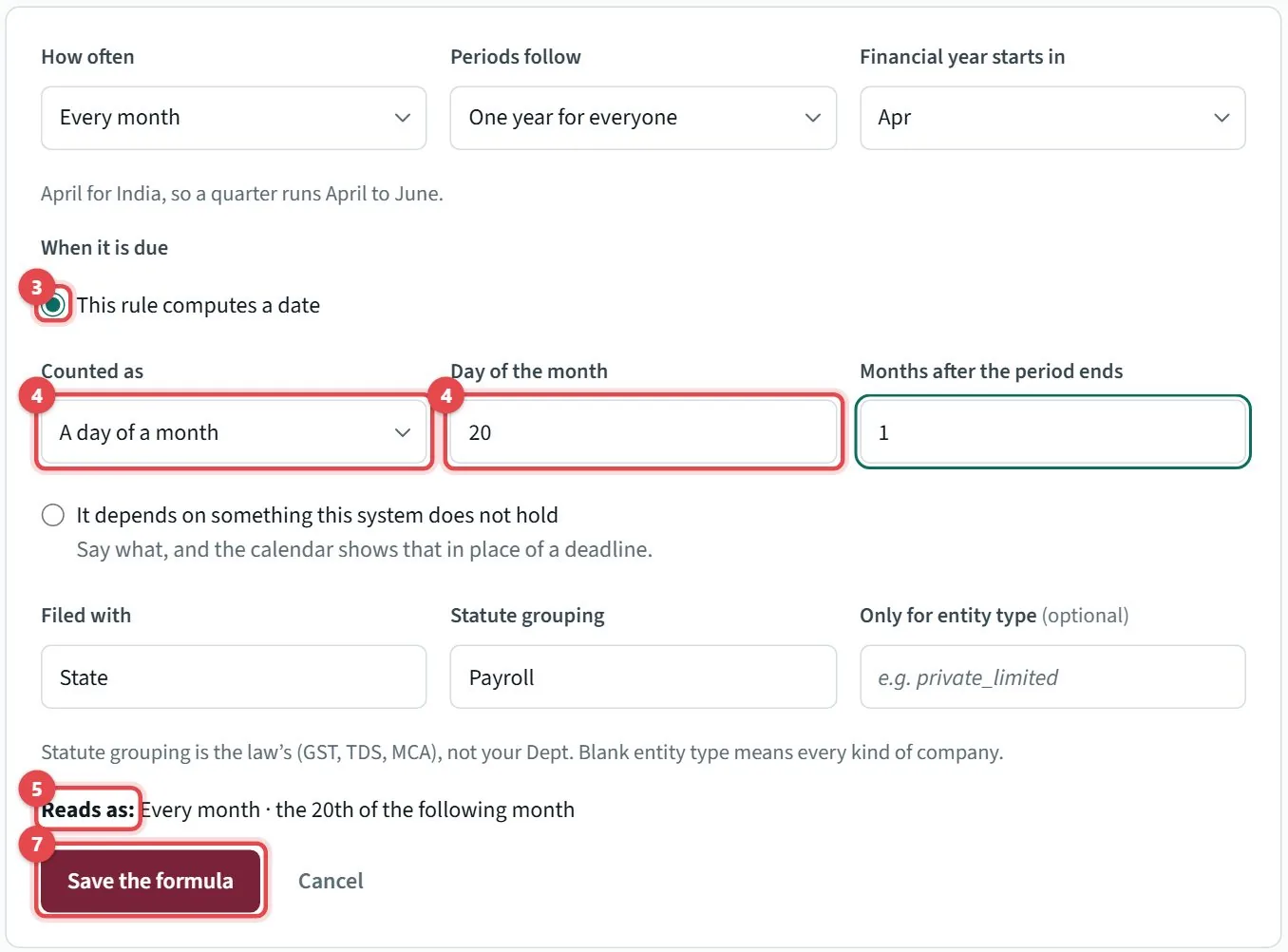 Professional Tax for clients in Karnataka: the 20th of the following month.
-
Fill in Filed with and Statute grouping if they are empty (for example "GST").
-
Click Save the formula.
-
If the rule is on a service, tick Confirmed on its row.
Only one month is different? Do not change the formula. Add an exception instead (next task).
| You see | Do this |
|---|---|
| "Give a day of the month from 1 to 31." | Type a day from 1 to 31. |
| "Give the months after the period ends. 0 is the same month." | Type 0, 1, 2… |
| "The period shape is fixed now." | The rule has already made filings. To change How often, retire it and write a new one. |